Your onboard feed hits the pit wall
before it hits the broadcast.
A quick-release race kit that moves between cars — front and rear camera pods, a sealed telemetry box, dual-antenna GNSS — with a bonded LTE uplink built in. Live video and timing to the pit wall and to your fans, from the same box that does the engineering. No extra box, no separate vendor.
Everything below is modelled in the demo right now — the actual software, seeded with a three-car GT4 test day. Hardware numbers are design targets. Start with the uplink ↓
LTE live streaming, built into the box
Race spec drops the silence rule: active fan cooling for sustained flat-out duty (race cars are loud anyway), and a built-in LTE uplink that streams live video and timing to the pit wall and your fans — included, from the same box that does the engineering. Two modems, two carriers, bonded into one stream off the car.
Uplink · bonded dual-modem, live from the cars running in /demo
Fan-out · one uplink, many viewers
One link off the car
Timing, onboard video and CAN share the same bonded uplink. Nothing else to mount, power or pay for.
No second vendor
The streaming box is the engineering box. The kit that coaches your driver is the kit that feeds the broadcast.
One subscription
$500 per car per month carries the live uplink, the fan stream and the whole platform — covering the team and the stream together.
The pit wall is a screen
Not a separate product — a view in the portal, with telemetry streaming in from every running car.
The uplink monitor, the fan-out and the pit wall are all live in the demo — watch a carrier drop and the stream hold. Watch it run →
Telemetry beside the radio, in the same room
The pit wall is a screen in the portal, not a separate product: telemetry streaming in from every running car — sectors, tire and brake temps, fuel — sitting beside the radio channel where the race engineer, the data engineer and Otto call the session between them.
01Every running car, one board
Sectors, tire and brake temps and fuel stream in from each car on the same bonded link that carries the video.
02Otto is on the channel
The AI race engineer sits in the radio thread with your engineers, answering from what's on the board in front of it — not from a car in general.
03Ahead of the broadcast
At 1.4–1.9 s glass-to-glass the wall sees the incident before the TV feed does. That's a call you can still make.
04Fans on the same feed
The public stream comes off the same uplink — no extra box, no separate vendor, no second production truck.
The live view — onboard video, live timing, the uplink monitor, the pit computer log and the pit radio — is open right now. Open the live pit wall →
Live coaching on test days. Log-and-debrief when it's sanctioned.
Live driver aids are prohibited in most competition classes. We're not going to pretend otherwise — so Paddock is built around the rule instead of against it. Teams get the data either way.
Live aids are for testing and practice — where the speed is actually found
When it's sanctioned, Otto runs silent record-only where your rulebook allows onboard logging, or comes off the car in two minutes where it doesn't. Then everything syncs, and the debrief writes next week's test plan.
Test & practice days
Full live coaching in the car — deltas, braking points, and traffic called out while the driver learns the track.
Race weekends
Live aids off, logging on. Every lap, every channel, every camera captured to the box and synced in the paddock.
Where logging isn't allowed
Quick-release means the whole kit comes off the car in two minutes — no bodywork to undo, no fitment to redo afterwards.
Either way, you get the data
Everything syncs the moment the car is back in the paddock, and the debrief engine goes to work on it.
Class-rules honest: live driver aids are prohibited in most competition classes — so Paddock runs live coaching on test days and switches to log-and-debrief for sanctioned sessions. Teams get the data either way.
Listen-only, always. The box reads OEM CAN or an aftermarket race ECU stream directly — nothing we do can touch how the car runs.
The same brain, on a quick-release mount
Race cars don't get bespoke pods. Paddock ships on quick-release mounts — cameras, box and antennas come out in minutes and move to the next car. One kit follows the driver, the chassis, or the trailer, whichever makes sense that weekend. No chassis-specific bodywork means no fitment wait.

Jetson-class compute at ~20 W

quick-release, matte carbon finish
In the case
- Quick-release mounts — cameras, box and antennas out in minutes
- Two camera pods — front and rear
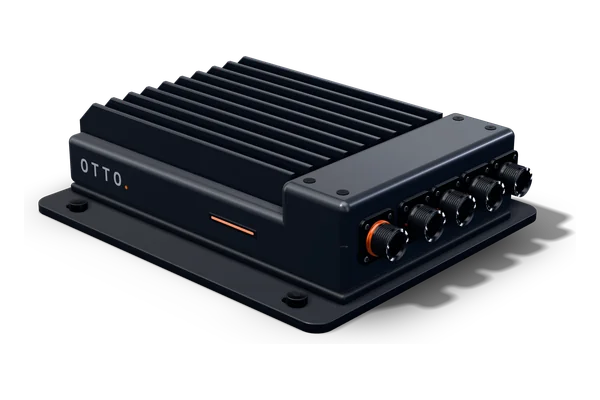
- Sealed telemetry box — machined aluminum, industrial-temp storage
- 7″ OTTO 1 Display — pit-ready, sunlight-viewable
- Transit case — black anodized aluminum, laser-etched unit number, custom foam for every component
What's inside it
- Jetson-class compute — continuous object tracking on ~20 watts, running the spotter onboard
- Dual-antenna GNSS — 25 Hz, multi-constellation, fused with a high-rate IMU. The antennas mount outside the cabin on a fixed baseline for true heading and real slip angle, not an estimate
- Two 1080p60 cameras — Sony low-light sensors, wide-angle, front and rear, synced to the data
- Voice in the helmet — Bluetooth to the earbuds or helmet comms the driver already runs (Cardo and the like), or wired into the helmet speakers or the car's intercom
- Runs on the box — recording, CAN decoding, lap timing, the spotter, brake-point and engine callouts, and the voice in and out, all onboard with no signal needed. The cloud adds the long answers, the debrief and the driver profile when there's signal
- Bonded LTE uplink — two modems, two carriers, one stream
- Active fan cooling for sustained flat-out duty — race spec drops the silence rule
- Works offline — satellite positioning, everything captured to the box
How it reads the car
- OEM CAN or an aftermarket race ECU stream, directly — CAN-FD tap
- Read-only, always. Otto reads your car and never writes to it — nothing we do can touch how the car runs
- Every car's trims, temps and pre-code warnings in one fleet-health view — catch the failure in the trailer, not on lap three
- Between cars it lives in the transit case — the crew knows what's missing at a glance
Every sensor in the car, under one umbrella
OTTO works with what's already in your car from day one — the ECU, or the AiM or MoTeC you run today. The Race Sensor Kit brings the rest under OTTO: brake pressure, steering, wheel speeds, tire and brake temps, dampers. One box becomes the logger, the dash, the cameras and the engineer.
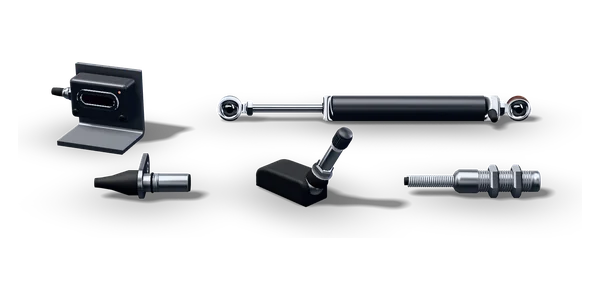 Wheel speed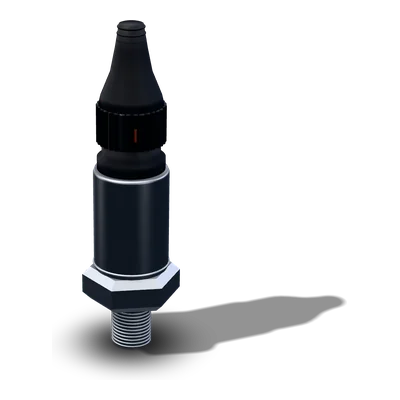
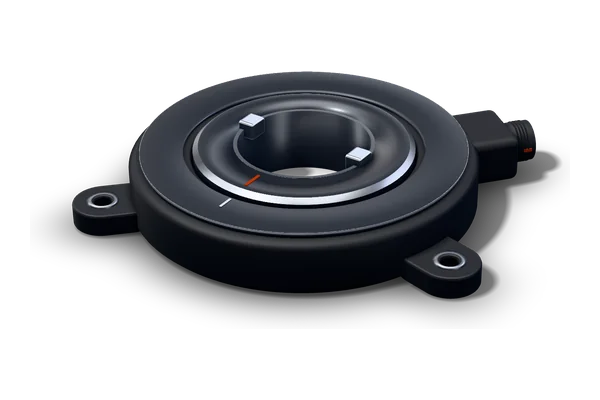
 Brake pressure F + R · steering · 8 analog · 4 wheel-speed · sensor CAN → one cable to the OTTO box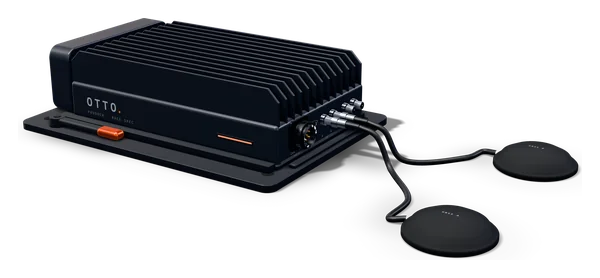
Brake & chassis
- Brake pressure, front and rear — brake bias, trail braking, how hard and how smooth every stop is
- Steering angle — understeer vs oversteer against yaw rate, and how smooth the hands are
- Wheel speed ×4 — lockups, wheelspin and traction, corner by corner
Full data
- Infrared tire temps across every tread — camber and pressure setup, and the lap the tire goes off
- Race tire pressures — live on the pit wall, every car
- Brake rotor temps ×4 — fade, cooling and endurance pace
- Damper position ×4 — ride, platform and curb strikes
Running an AiM or MoTeC? OTTO reads it on day one.
There's nothing to rip out: OTTO takes every channel your dash and ECU already log. Add the Race Sensor Kit when you want every sensor under one umbrella — so the next car needs one system instead of a logger, a dash, a camera system and a radio.
Add-on to Paddock, quoted per car. Pilot teams first.
Every car, every session, one screen
Live over LTE on track; full-quality files sync the moment they hit paddock Wi-Fi. The engineer opens a laptop and it's already there — no card readers, no per-car software, no waiting on a data guy.
Practice 2 — driver comparison
Driver-vs-driver overlays in plain English, minutes after the session
Not that night, not next week. "P2 gains it all in sector two — he's flat where you lift." The engine writes next week's test plan out of what actually happened this weekend, and the AI race engineer answers from your session — with your numbers in the answer, not a car in general.
Driver vs driver
Corner by corner, in language a driver can act on. The overlay says where the time went and who has it.
Fleet health
Every car's trims, temps and pre-code warnings in one view. Catch the failure in the trailer, not on lap three.
Ask it anything
The AI race engineer reads the session that's loaded — laps, channels, best lap — and answers out of it.
Your data, exportable
Raw export, any time, in open formats. It's yours.
The portal is open right now, loaded with a three-car GT4 test day across six real circuits. Open the team portal demo →
Six real tracks — with the hills left in
The portal doesn't run on a generic loop. It runs on layouts you actually race — traced from OpenStreetMap, with heights from USGS lidar — with the real corner names and the real elevation profile of each one. The lap model reads the grade at every point — so climbs cost acceleration and descents cut braking capacity, exactly like they do in the car.
01The hill is in the physics
Every track carries a distance-to-height profile, and the speed model solves against it. An uphill stop and a downhill stop don't come out the same — because they aren't the same.
02Brake references are computed
Ask about a corner and you get brake distance, entry and apex speed, and the height change through the zone — solved by the model for that car on that profile. Nothing is read out of a track guide.
03Corners have names
The Corkscrew, the Carousel, Canada Corner, the Bus Stop, the Boot. Otto talks about the lap the way your driver does, not in turn numbers off a map.
04It shows its work
The elevation strip sits under the trace, so you can see the same climb the model is braking against. Disagree with a number and the profile's right there to argue with.
05It knows the track's tricks
Every circuit carries what the regulars already know: where to pass, where it's slick, which line. On the radio it sounds like "Okafor, 0.3 s to the car ahead — use him as a tow down the back straight and pass him into T10A."
Those two references came out of the solver, not a spreadsheet. Switch circuits in the portal and every number on the page — brake points, sector splits, the theoretical lap — is recomputed for the new profile. Go pick a track →
Keep the logger you already own
Nobody's asking you to bin a RaceBox or relearn a toolchain to try this. Export what you already record, drop the file into the portal, and it's parsed in seconds — laps, channels and best lap, straight into the AI's working memory. Ask about it one view over and the answer comes back with your numbers in it.
Imports today
- RaceBox / RaceBox Pro — CSV export
- MoTeC i2 — CSV export
- AiM RaceStudio — CSV export
- VBOX Circuit Tools — CSV export
- Garmin Catalyst — session CSV
- Plain CSV too — if it's tabular, it gets read
What comes back
- Laps split automatically, with the best one called out
- Channels found by name — speed, RPM, throttle, brake, gear, g, tire and brake temps, water, oil — min, average and peak on each
- Sample rate and session length read off the file, and the logger identified from its own fingerprint
- Parsing happens in your browser. Only the short digest is ever sent anywhere — the raw file doesn't leave your laptop
- Typed debriefs and pasted stint notes land in the same place. Notes are data too
Coming PILOT — NOT SHIPPING
- Direct MoTeC and Bosch ECU feeds — no export step at all
- Direct CAN from Link, Haltech and ECUMaster
- These are not shipping yet. They go to pilot teams first — if you want to be one of them, say so at the team desk
No file handy? The portal will generate a sample RaceBox export and run it through the same parser. Try the import →
Everything on the market does one third of the job
Nobody sells a factory-clean install that talks to you and is also your dashcam. Garmin Catalyst is the closest — and it never plugs into the car. The full matrix: 23 capabilities across 8 products →
| Capability | RaceBox / AiM | Garmin Catalyst | Dashcam | OTTO |
|---|---|---|---|---|
| GPS lap & sector timing | Yes | Yes | No | Yes |
| Vehicle data (RPM, throttle, brake, temps) | AiM only | No | No | Yes |
| Live pit wall, every running car | Pro-tier radio option | No | No | Yes |
| Talks back — ask it why | No | Scripted cues | No | Yes |
| Live voice coaching | No | Scripted cues | No | Yes — it thinks |
| Looks like it came with the car | Suction cup | Bulky pod | Wire down the glass | Built per chassis (OTTO 1) · quick-release (Paddock) |
| Doubles as a daily dashcam | No | No | Yes | Yes |
| Engine health / pre-code warnings | No | No | No | Yes |
| Measured slip angle (drift) | No | No | No | Yes |
| Radar threat integration | No | No | No | Yes |
| Auto-edited clips for socials | No | No | No | Yes |
| Imports the others' exports | No | No | No | Yes |
| Trackside sector beacons (ground-truth timing) | No | No | No | In development |
| Gets better after you buy it | Firmware fixes | Firmware fixes | No | Over-the-air updates |
Scroll the table sideways for the OTTO column →
None of which means you have to pick a side on day one — the team portal reads their exports, so you can run whatever you own today and still get the engineer.
Bring your history. Otto learns your cars overnight.
Most teams are sitting on years of data doing nothing — old session logs, setup sheets, lap times from tracks you've run a dozen times. Hand it over on day one and Otto starts smart instead of starting blank.
You get an AI engineer that already knows your program. We get the one thing money can't buy.
A coaching system is only as good as what it's seen. Ours could spend a year learning from scratch — or start from your archive: every stint, every setup change, every lap at every circuit you've run. Import it once and the coach shows up already fluent in your cars, your drivers, and your tracks.
What you dump in
Old session logs — MoTeC, AiM, RaceBox, VBOX, Catalyst, plain CSV — through the same importer that's live in the portal today, plus setup sheets, tyre and fuel notes, historic lap and sector times, driver rosters.
What you get back, immediately
Benchmarks against your own history instead of nothing. "That's your third-best S2 ever." Setup-to-laptime correlations across seasons you never had time to analyse.
What it becomes by round three
A coach fluent in your specific cars — knowing that car 41 always runs hot late in a stint, that this driver brakes early at this circuit, what your fast setup looked like last year.
What we get
Real racing data at a volume no startup starts with. It makes the coaching sharper — for you first, then for everyone after you.
Your data stays yours. You own it, you can export all of it any time, and you can delete it. Anything that improves the shared model is aggregated and stripped of identity — no team's setups, times or telemetry are ever visible to another team. That's in the agreement, not just the pitch.
Founding programs get more than a discount: the cars you run shape what the coach becomes, and the features you ask for get built first.
Why this is buildable now and wasn't three years ago
Three parts got cheap at the same time. That's the window.
01Dual-antenna GNSS got affordable
True vehicle heading used to mean motorsport-grade equipment. It's now a module you can buy — which is the entire reason real slip angle is possible at this price.
02Edge AI runs in a car
Vision inference used to need a workstation. A Jetson-class module now does continuous object tracking on 20 watts, passively cooled, in a box under a seat.
03Voice AI became conversational
The coach only works if it talks like a person. That stopped being science fiction very recently — and it's the part every existing data logger still can't do.
04The CAN work is already public
A decade of tuning-community reverse engineering means supported platforms are verification work, not invention.
Race teams first. Then everyone else.
Not because the street product is an afterthought — because this is how you make it good.
01The hardest users first
Race engineers tell you exactly what's wrong, immediately, without being polite about it. That's the feedback loop you want before a single street car gets one.
02Data no enthusiast can generate
Thousands of hard laps across multiple cars and drivers in a season. The coaching gets sharpened on real racing, not commutes.
03Built for where it's brutal
Heat, vibration, curbs, and mechanics who baby nothing. Survive a season in the paddock and your daily is easy.
04Ready soonest
Quick-release mounting means no per-chassis wait — teams can be running before the first consumer platform exists. Limited first-season slots.
One kit price, one subscription — covering the team and the stream
Target positioning; final pricing set after the first production run. Limited slots for the first season.
- Quick-release mounts that move between cars
- Two camera pods — front and rear
- Active fan cooling · race-duty build · sealed telemetry box
- 7″ OTTO 1 Display — pit-ready, sunlight-viewable
- LTE live streaming built in — live video and timing to the pit wall and your fans, no extra box, no separate vendor
- The bonded LTE uplink off every car
- The fan stream — no viewer ceiling
- The portal, the debrief engine and the AI race engineer
- Fleet health across every chassis in the trailer
- Fleet rates from 3+ cars — quoted per program
The streaming vendor, the logger and the data engineer are all in the one line
Live coaching on test days, silent record-only when sanctioned, driver-vs-driver debriefs minutes after the session, fleet health across every chassis, and the live pit wall with the fan stream coming off the same link. Fleet rates from 3+ cars, quoted per program.
No chassis-specific bodywork means no fitment wait — teams can be running before the first consumer platform exists. Limited slots for the first season. Pricing shown is target positioning, not a quote.
The questions teams ask first
01Is this legal in our class?+
02Can it touch the ECU?+
03Do we have to bin the logger we own?+
04Who owns the data?+
05Does the kit fit our cars?+
06When can we start?+
07Do we have to replace our AiM or MoTeC?+
Talk about a Paddock program
No deposit, no card. Tell us what you run and you'll hear back from the person building it — usually within a day.
Talk about a Paddock program
Quick-release units across your cars, fleet rate per unit plus a team subscription, quoted per program. Limited slots for the first season.
Or just open the demo
A three-car GT4 test day on six real circuits — sessions, laps, telemetry traces, driver-vs-driver analysis, file import, the live pit wall and an AI race engineer that answers from your session. Not a video — the actual software.
Team portal
Sessions, laps, telemetry traces, driver-vs-driver analysis, file import, and the live pit wall: streaming telemetry beside pit radio between the race engineer, the data engineer and Otto.
OTTO 1
The flagship AI co-driver for a road car — dashcam every day, live gauges on your phone, engine watch, track coaching, drift scoring. Read-only, always.
Owner app
The phone app with a real multi-car garage: drives, dashcam clips, drift scores, engine health and trip logs — and the co-driver chat.